

 Undetected
Mason Eac
$4.25 / 1 DayGo to
 Undetected

Help with purchases and setup
Response time depends on workload and the complexity of your issue. Add updates to the same ticket.
 Product description
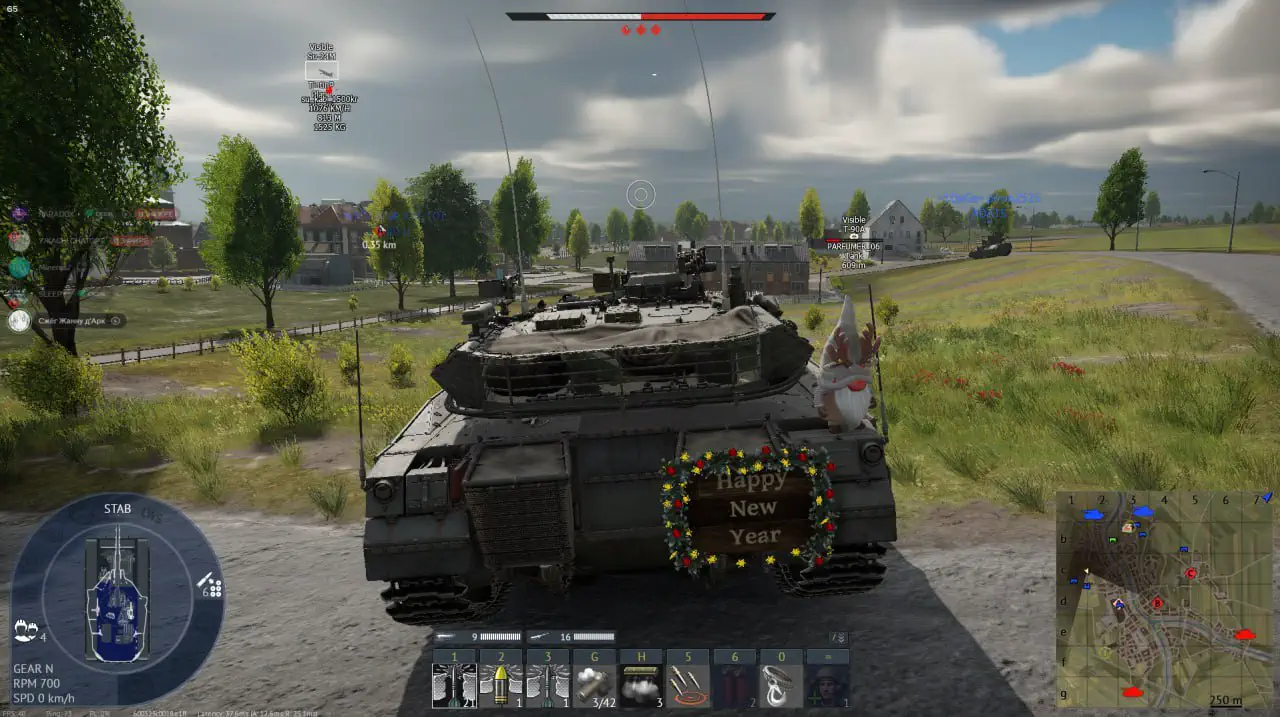
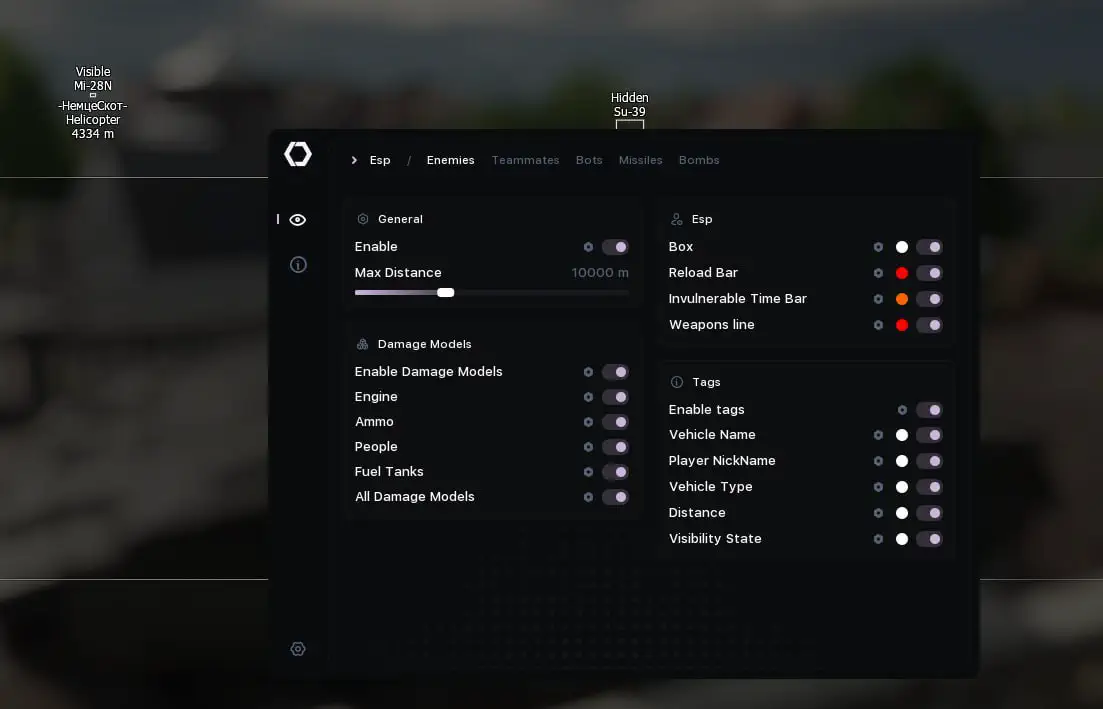
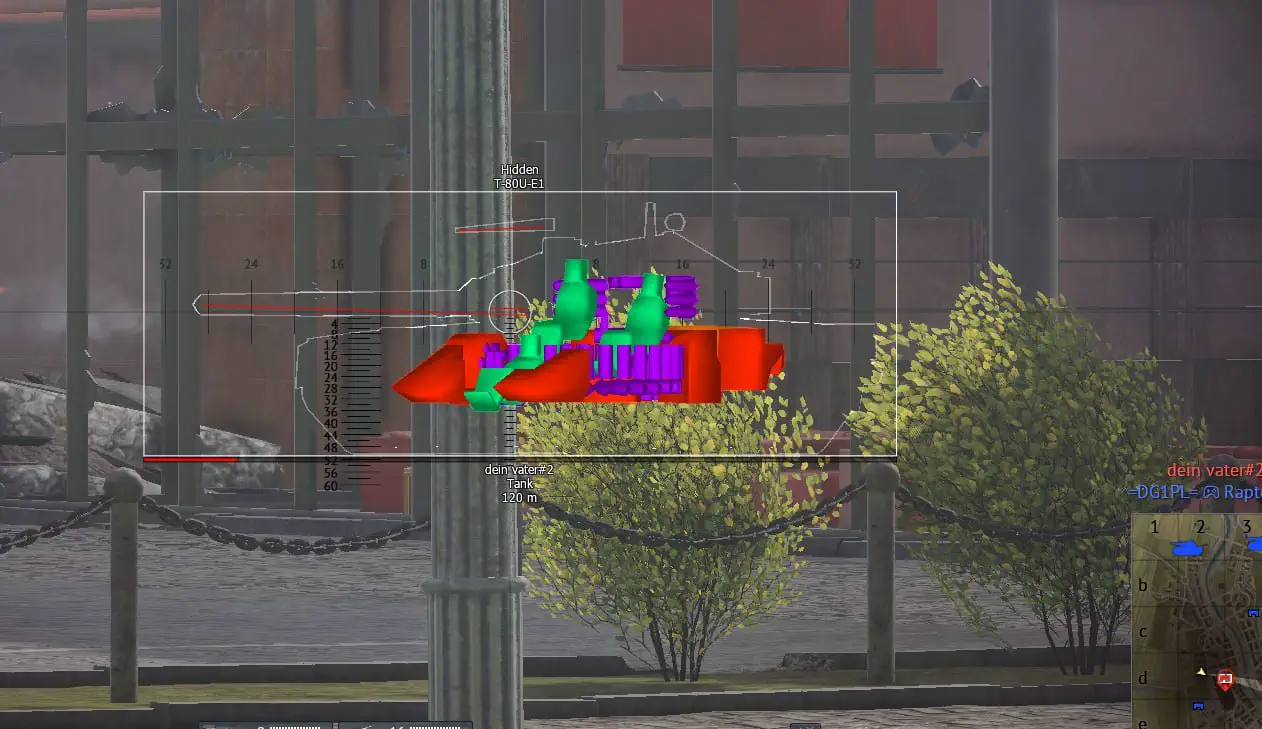
Specter is a private Tundra build: aimbot and ESP. It shows enemies, vehicles and distance to target, with settings in the menu. Runs in arcade and realistic battles.
 Visuals

 ESP for Enemies/Teammates/Bots | ESP for Opponents/Teammates/BotsBasic settingsEnabled — EnableEnabled Tanks — Enable on tanksEnabled Planes — Enable on planesEnabled Helicopters — Enable on helicoptersEnabled Ships — Enable on shipsMax Distance — The maximum display distance.Max Dormant Time — Maximum inactivity time (ms)Dormant Color Alpha Multiplier — Transparency multiplier for inactive objectsFrame Settings (Bounding Box)Draw Bounding Box — Display the frameBounding Box Type — Type of frame (2D / 2D with corners / 3D)Bounding Box Color — The color of the frameBounding Box Fill Color — The color of the frame fill.Bounding Box 3D Front Color — The color of the front of the 3D frameBounding Box Thickness — The thickness of the frame linesBounding Box Rounding — Rounding the corners of the frameRecharge Bar Settings (Reload Bar)Draw Reload Bar — Display the recharge barDraw Reload Bar Only If Reloading — Show only when reloadingReload Bar Bound — The position of the recharge barReload Bar Resize Type — The type of band size change.Reload Bar Background Color — The background color of the recharge barReload Bar Full Color — The color of a full rechargeReload Bar Not Full Color — The color of an incomplete rechargeReload Bar Frame Color — The color of the frame of the recharge barReload Bar Frame Rounding — Rounding the frame of the recharge barReload Bar Width — The width of the recharge bar.Invulnerability Bar Settings (Invulnerable Bar)Draw Invulnerable Bar — Display invulnerability barDraw Invulnerable Bar Only If Invulnerable — Show only if invulnerableInvulnerable Bar Bound — The position of the invulnerability bandInvulnerable Resize Type — The type of band size change.Invulnerable Bar Background Color — The background color of the invulnerability barInvulnerable Bar Color — The color of the invulnerability barInvulnerable Bar Frame Color — The color of the invulnerability bar frameInvulnerable Bar Frame Rounding — Rounding the frame of the invulnerability barInvulnerable Bar Width — The width of the invulnerability bar.Tag Settings (Tags)Tags Enabled — Enable tagsTags Draw Vehicle Name — Display the name of the vehicleTags Vehicle Name Bound — The position of the vehicle nameTags Vehicle Name Color — The color of the vehicle nameTags Draw Player Nick — Display player's nicknameTags Player Nick Bound — Position of the player's nicknameTags Player Nick Color — The color of the player's nicknameTags Draw Vehicle Type — Display the type of vehicle.Tags Vehicle Type Bound — Vehicle type positionTags Vehicle Type Color — The color of the type of vehicle.Tags Draw Distance — Display the distanceTags Distance Bound — Distance positionTags Distance Color — The color of the distanceTags Draw Visibility State — Display the visibility stateTags Visibility State Bound — Position of the visibility stateTags Visibility State Color — The color of the visibility stateTags Frame — The frame around the tagsTags Text Outline — The outline of the tag textTags Text Outline Color — The outline color of the tag textTags Frame Color — The color of the tag frameTags Frame Rounding — Rounding the tag frameDamage Models SettingsDamage Models Enabled — Enable damage modelsOutline Thickness — The thickness of the outlineEngine (Engine)Draw Engine — Display the engineDraw Engine Model — Display the engine modelEngine Color — Engine ColorDraw Engine Outline — To display the outline of the engineEngine Outline Color — The engine outline colorAmmunition (Ammo)Draw Ammo — Display ammunitionDraw Ammo Model — Display the ammo modelAmmo Color — The color of ammunitionDraw Ammo Outline — Display the outline of ammunitionAmmo Outline Color — The color of the ammunition outlineCrew (People)Draw People — Display the crewDraw People Model — Display the crew modelPeople Color — The color of the crewDraw People Outline — To display the outline of the crewPeople Outline Color — The color of the outline of the crewFuel TanksDraw Fuel Tanks — Display fuel tanksDraw Fuel Tanks Model — Display the model of fuel tanksFuel Tanks Color — The color of the fuel tanksDraw Fuel Tanks Outline — Display the outline of fuel tanksFuel Tanks Outline Color — The color of the fuel tank outlineAll Damage ModelsDraw All Damage Models — Display all damage modelsDraw All Damage Models Model — Display models of all damageAll Damage Models Color — The color of all damage modelsDraw All Damage Models Outline — To display the outline of all modelsAll Damage Models Outline Color — The outline color of all modelsWeapons Line SettingsDraw Weapons Line — Display a line of weaponsDraw Only Main Weapons Line — Display only main weaponsDraw Weapons Line Color — The color of the weapon lineESP for Missiles/Bombs | ESP for Missiles/BombsBasic settingsEnabled — EnableMax Distance — The maximum display distance.Icon SettingsDraw Icon — To display an iconIcon Draw Type — Display type (Dot/Icon)Draw Icon Color — The color of the icon.Draw Icon Size — The size of the icon.Shell Tag SettingsTags Enabled — Enable tagsTags Draw Distance — Display the distanceTags Distance Bound — Distance positionTags Distance Color — The color of the distanceTags Draw Name — Display the nameTags Name Bound — The position of the nameTags Name Color — The color of the nameTags Draw Mass — Display the massTags Mass Bound — The position of the massTags Mass Color — The color of the massTags Draw Speed — Display speedTags Speed Bound — Speed positionTags Speed Color — The color of speedExplosion direction and timer settings (for bombs only)Draw Direction — To display the directionDirection Length — The length of the direction lineDirection Color — The color of the direction lineDraw Explosion Timer Bar — Display the explosion timerExplosion Timer Bar Bound — The position of the explosion timerExplosion Timer Bar Resize Type — The type of timer size change.Explosion Timer Bar Background Color — The background color of the explosion timerExplosion Timer Bar Color — The color of the explosion timerExplosion Timer Bar Frame Color — The color of the explosion timer frameExplosion Timer Bar Frame Rounding — Rounding the frame of the explosion timerExplosion Timer Bar Width — The width of the explosion timerGeneral SettingsBasic parametersLanguage — Interface languageFps Sync With Game Supported — Supports FPS sync with the gameFps Sync With Game — Sync FPS with the gameOverlay V-Sync — Vertical synchronization of the overlayOverlay GPU Priority — GPU priority for the overlayComplaints Window SettingsComplaints Window — Enable the complaints windowComplaints Window Background Color — The background color of the complaints windowComplaints Window Title Color — The color of the complaints window title.Complaints Window Pos X — The position of the window on the X axisComplaints Window Pos Y — The position of the window on the Y axisMiniMap SettingsBasic minimap settingsMiniMap Window — Enable the minimap windowMiniMap Window Pos X — The position of the window on the X axisMiniMap Window Pos Y — The position of the window on the Y axisMiniMap Color — The background color of the minimapMiniMap Size — The size of the minimapMiniMap Radius — The radius of the minimap display.MiniMap Circles Radius — The radius of the circles on the minimapMiniMap Barrels Length — The length of barrels on the minimapSettings for your equipmentMiniMap Self Color — The color of your equipmentMiniMap Draw Self Barrel — Display your own barrelMiniMap Draw Self Barrel Color — The color of your barrelEnemy SettingsMiniMap Draw Enemies — Display enemiesMiniMap Draw Enemies Color — The color of the enemiesMiniMap Draw Enemies Barrel — Display enemy barrelsMiniMap Draw Enemies Barrel Color — The color of the enemies' barrelsAlly SettingsMiniMap Draw Teammates — Display alliesMiniMap Draw Teammates Color — The color of the alliesMiniMap Draw Teammates Barrel — Display barrels of alliesMiniMap Draw Teammates Barrel Color — The color of the barrels of the alliesBot SettingsMiniMap Draw Bots — Display botsMiniMap Draw Bots Color — The color of the botsMiniMap Draw Bots Barrel — Display the barrels of botsMiniMap Draw Bots Barrel Color — The color of the bots' barrelsMissile SettingsMiniMap Draw Missiles — Display missilesMiniMap Draw Missiles Color — The color of the missilesMiniMap Draw Missiles Barrel — Display the direction of missilesMiniMap Draw Missiles Barrel Color — The color of the missile directionMiniMap Missiles Font Size — The font size for missilesBomb SettingsMiniMap Draw Bombs — Display bombsMiniMap Draw Bombs Color — The color of bombsMiniMap Draw Bombs Barrel — Display the direction of bombsMiniMap Draw Bombs Barrel Color — The color of the bombs' directionMiniMap Bombs Font Size — The font size for bombs


Отлетел в бан за неделю, использовал только в самолётных боях, без аима, только упреждение и esp на врагов. Банится на раз-два.
 Recent purchases
100
purchases
Specter actually includes: box ESP and vehicle ESP. The full function list and settings are shown on the product card.
Specter runs via an external loader and is updated regularly for current patches. There is no full guarantee against a ban - play carefully and check the status before launching.
After payment the key arrives in your account automatically in about 60 seconds. You then download the loader and activate the key per the guide attached to Specter.
Specter starts at around 329₽ for the shortest plan. Exact prices per duration are on the product card.
To run Specter you usually need Windows 10/11 x64; some loaders require disabling Secure Boot/HVCI. Exact system requirements and compatibility are listed on the card and in the guide.


In any game with any cheat you can get banned. Try to play as carefully as possible!

 HOT