Arayas
ARAYAS CHEATS
Bleak

Bleak

WARDOGS Cheats
WARDOGS CheatsBleak
Undetected
No reviews
Payment
How to buy

Key right after paymentReplacement guarantee

1 Day · $3.00/day$3.00

Arayas support

Help with purchases and setup

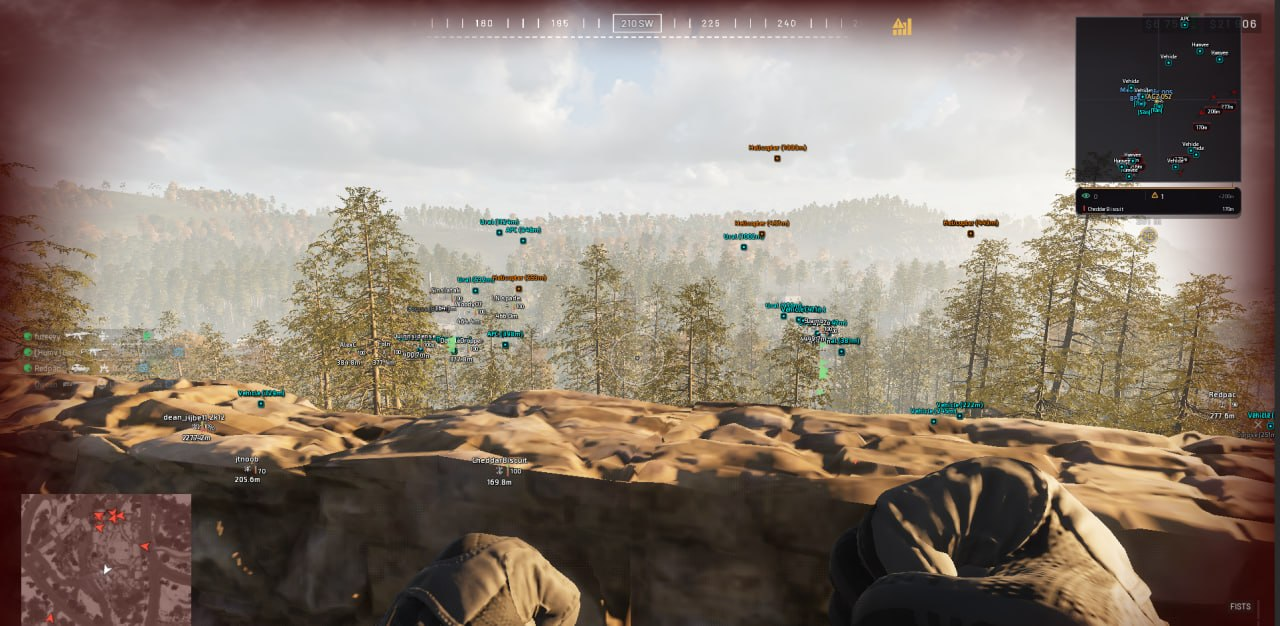
Bleak — screenshot 1
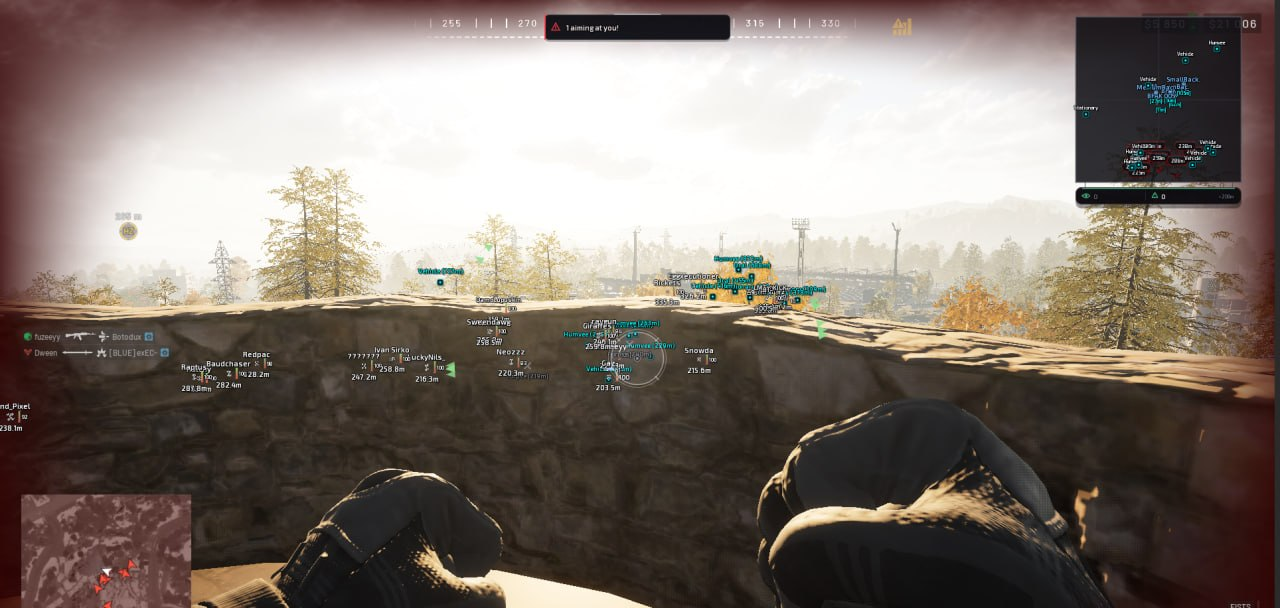
Bleak — screenshot 2
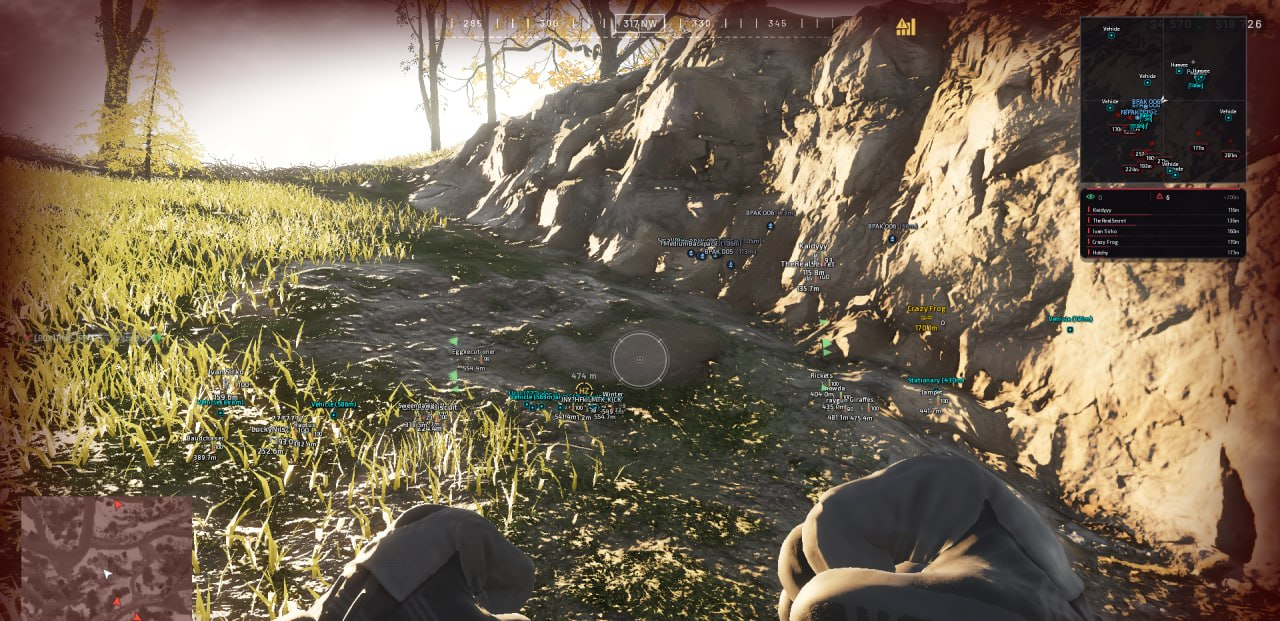
Bleak — screenshot 3
Bleak — screenshot 4
Bleak — screenshot 5
Bleak — screenshot 6
Bleak — screenshot 7
Bleak — screenshot 8
Bleak — screenshot 9
Product description

Bleak for WARDOGS combines aiming with bullet prediction, recoil control, player, loot and vehicle ESP, and a configurable 2D radar. It includes faction and vehicle filters, danger warnings, color customization and saved configurations. Discord Overlay is required; review the setup guide and requirements before buying. The developer lists Windows 10 / 11 [2004–26H1] and support for enabled Secure Boot. Its requirements include disabling Windows Defender, VBS and Core Isolation; this reduces PC security.

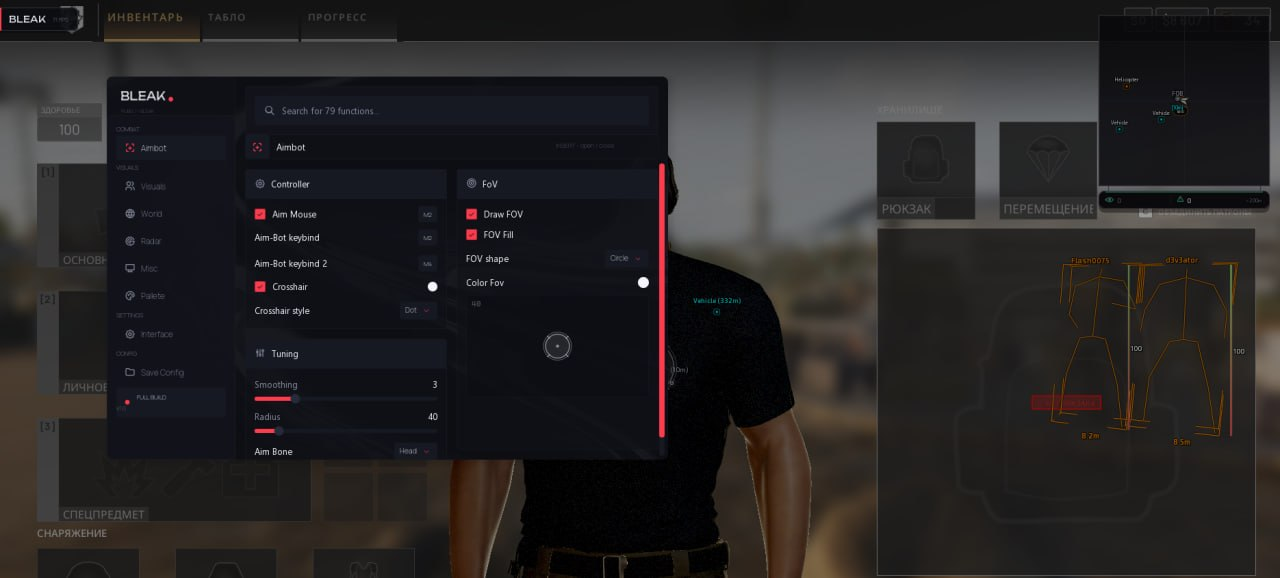
Aim Mouse - AimBot's main switch. Activates standard auto-aiming at enemies inside the FoV zone.
Aim-Bot keybind - Primary activation key. Aiming only works while holding this key, making it controlled and natural.
Aim-Bot keybind 2 - Second (additional) activation key - convenient to bind to a mouse side button.
Crosshair - Enables the display of a static crosshair in the center of the screen (with its own color).
Crosshair style - Static crosshair style: Dot, Cross, T-Cross, Ring or Chevron.
Smoothing - The smoothing strength of the crosshair (1-10). High values create a smooth, human-like movement, rather than sharp, robotic jerks. A key setting for legitimacy.
Radius - The radius of the aiming area (Field of View) in pixels (0-300): the on-screen area within which the AimBot locks onto a target.
Aim bone selection: head, neck or chest.
Draw FOV - Show the aiming zone on screen.
FOV Fill - Fill the aiming zone from inside (can be disabled - only the outline remains).
FOV shape - Shape of the aiming zone: Circle, Triangle or Diamond.
Color Fov - Color of the aiming zone. A live mini-preview of the zone with the current radius and shape sits next to the settings.
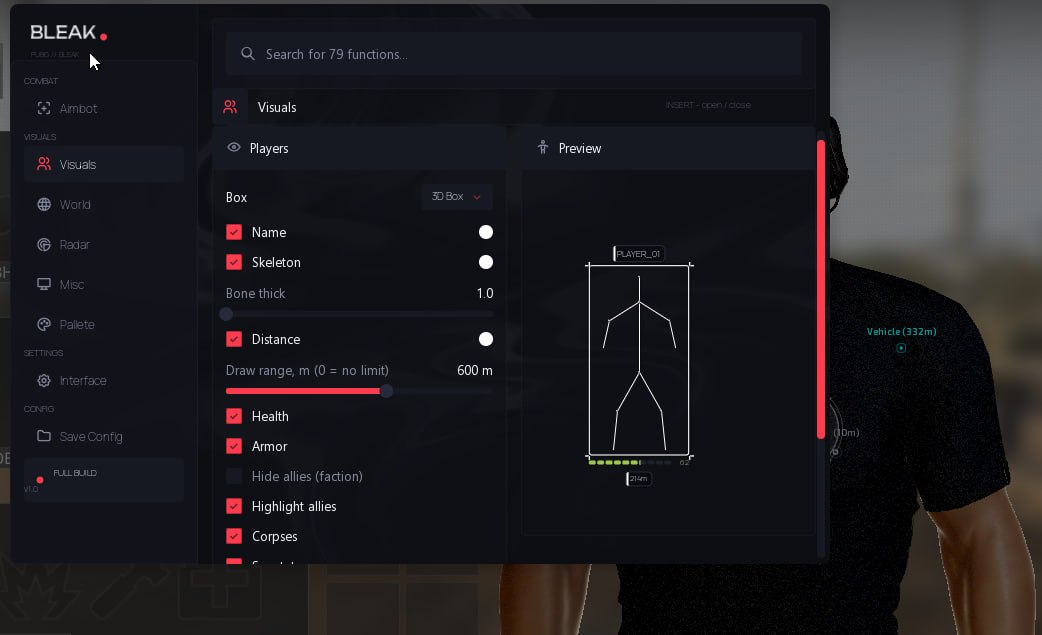
Box Type - Select the type of box displayed around the target (Full, Corner, 3D Box, None).
Names - Displays player nicknames above players' heads.
Skeleton - Enables display of the enemy's skeleton.
Bone Thick - Slider for adjusting the thickness of the skeleton lines (1-5).
Distance - Displays the distance to the target in meters.
Draw range - Player rendering range in meters (0 = no limit). Very distant targets switch to a simplified mode (box without skeleton) so the reading channel is not overloaded.
Health - Enables the health bar to display a player's health.
Armor - Enables the player's armor bar.
Hide allies (faction) - Hides faction mates (the game has three factions: Lonestar / Valkyra / Manticore). In the lobby and at the starting base everyone shares one faction - turn it off to see everyone.
Highlight allies - Highlights your allies with a dedicated color (in ESP and on the radar).
Corpses - Displays dead players as gray markers so they are not confused with live enemies.
Spectators - Displays the list of spectators (those watching you after death).
Admin in lobby warn — warning when an administrator or developer appears in the lobby; checked every 2 seconds. Does not guarantee protection from bans.
Danger warning - Warning panel about nearby enemies: a counter and a list of the closest opponents.
Off-screen arrows - Arrows at the screen edges pointing toward off-screen enemies.
Arrows radius - Radius of the circle along which the off-screen arrows are placed (100-600).
Aiming at me warn - Warning shown when an enemy is aiming directly at you.
Preview - Live preview of your configured ESP right in the menu (box, skeleton, name, distance, bars).
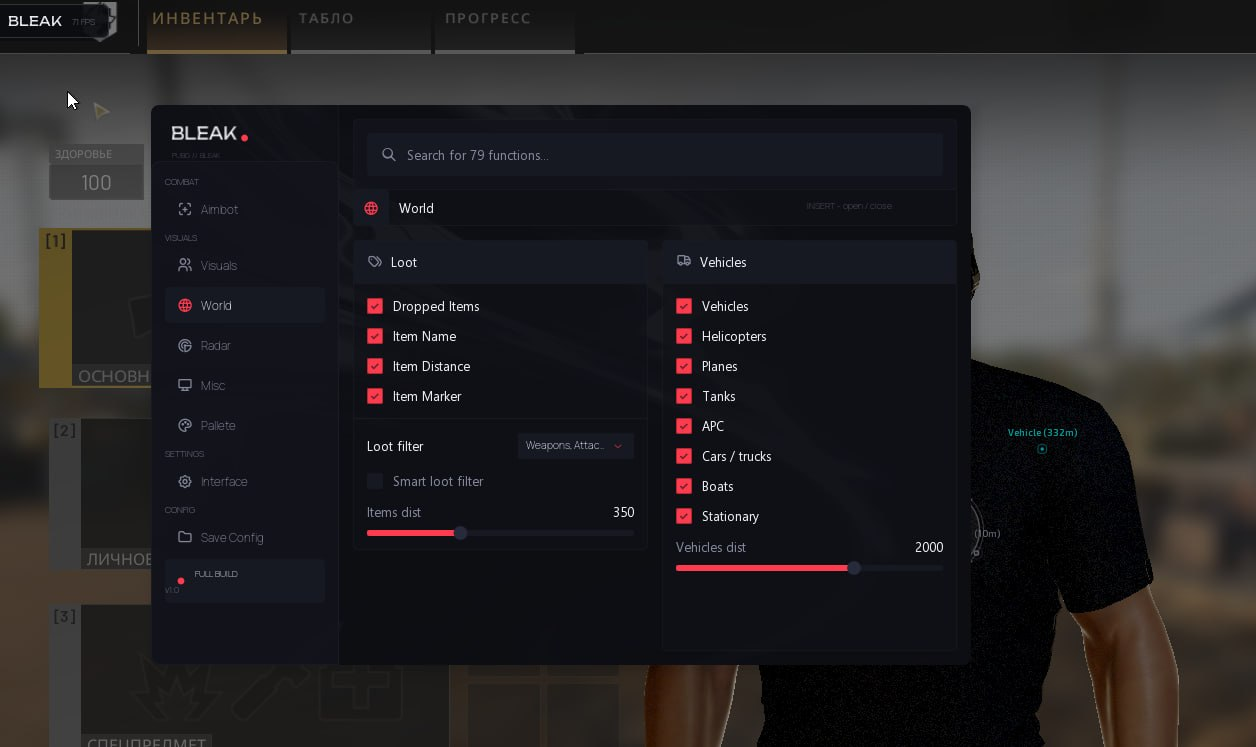
Dropped Items - Main toggle for loot ESP (shows dropped items on the ground).
Item Name / Item Distance / Item Marker - Loot sub-options: item name, distance to it, and the marker.
Loot filter - Select which categories to display: Weapons, Attachments, Ammo, Meds/Boost, Armor, Helmets, Backpacks, Grenades, Other.
Smart loot filter - Smart filter: accounts for your backpack contents and hides the excess (meds/grenades when you have enough).
Items dist - Item rendering distance (0-1000m).
Vehicles - Vehicle ESP: name and distance.
Vehicle filters - Helicopters, Planes, Tanks, APC, Cars/trucks, Boats, Stationary weapons - enable only the types you need.
Vehicles dist - Vehicle rendering distance (0-3000m).
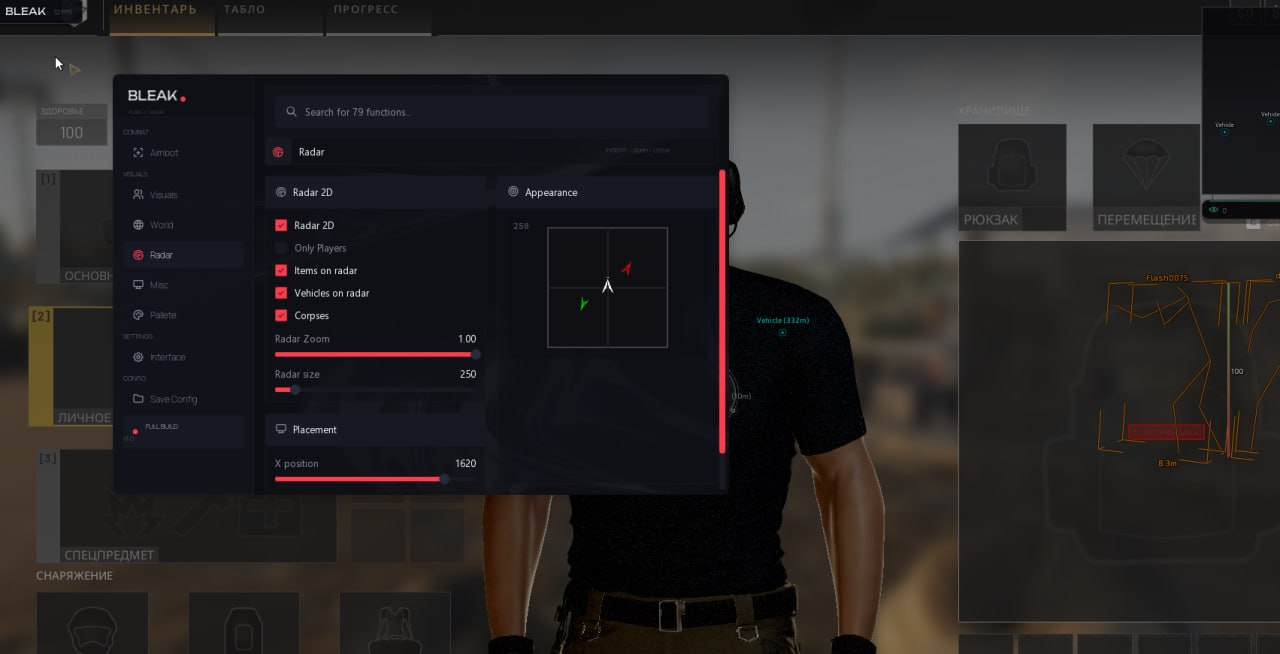
Radar 2D - Main toggle, displays a 2D radar (dark card, chevron contacts, white camera arrow in the center).
Only Players - Filters the radar to display only players, hiding unnecessary information.
Items on radar - Shows loot on the radar.
Vehicles on radar - Shows vehicles on the radar.
Corpses on radar - Shows corpses on the radar (separate toggle).
Radar Zoom - Radar scaling (allows you to zoom in or out on objects).
Radar size - Slider for changing the overall size of the radar window on the screen (from 200 to 700).
X position / Y position - Sliders for precise radar positioning along the X and Y axes of your monitor.
Appearance - Live preview of the radar's look right in the menu.
No recoil (memory) - Memory-based recoil control: while enabled, the current weapon's recoil (ViewKick) is zeroed; when disabled, the original value is automatically restored.
Bullet prediction - Bullet prediction: the AimBot accounts for the target's movement velocity (lead) and bullet drop over distance; ballistics come from the weapon currently in your hands.
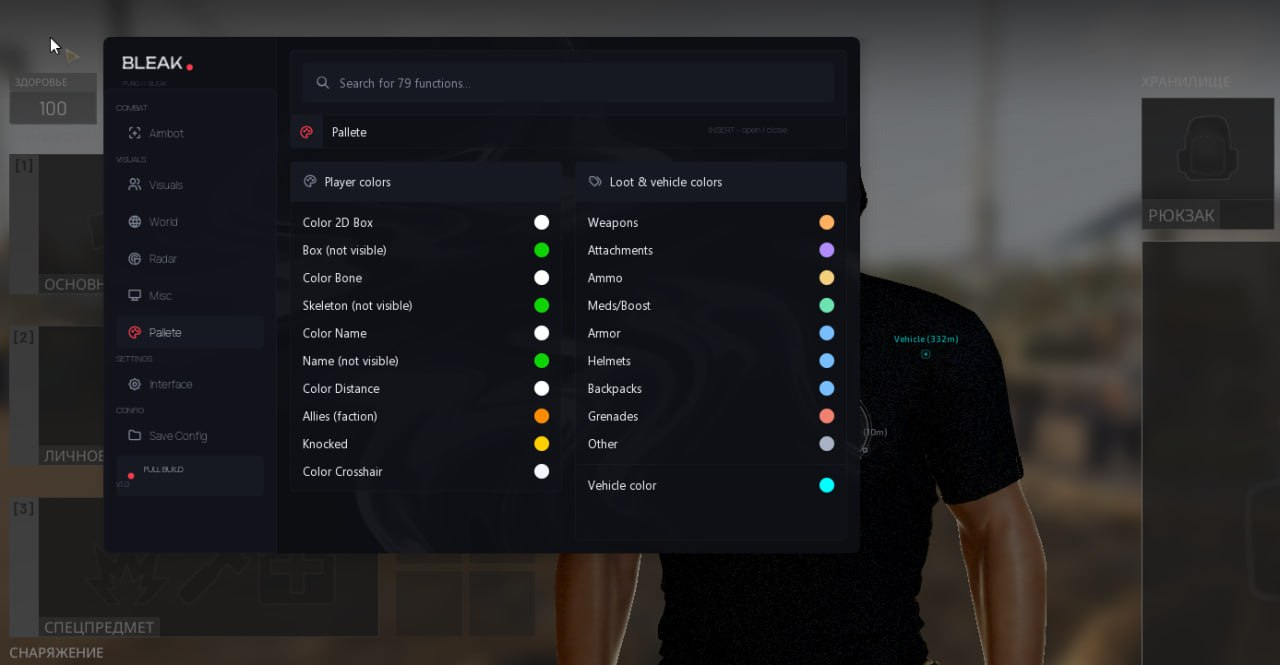
Color 2D Box - Color of the box around the enemy.
Box (not visible) - Box color for the "not visible" rendering variant.
Color Bone - Color of the skeleton lines.
Skeleton (not visible) - Skeleton color for the "not visible" variant.
Color Name - Player nickname color.
Name (not visible) - Name color for the "not visible" variant.
Color Distance - Distance text color.
Allies (faction) - Ally highlight color (ESP + radar).
Knocked - Color of knocked players (so they are not confused with allies).
Color Crosshair - Color of the static crosshair in the center of the screen.
Loot colors - Per-category loot color settings: Weapons, Attachments, Ammo, Meds, Armor, Helmets, Backpacks, Grenades, Other.
Vehicle color - Vehicle ESP color.
Menu color - Menu accent (theme) color.
Overlay FPS limit - Overlay FPS limit (0-360): raise it for smoother ESP.
Watermark - On-screen watermark.
Language - Menu language: English / Русский (all menu items and item names are translated).
Search - Search bar across all menu functions (in the header).
INSERT - Open / close the menu.
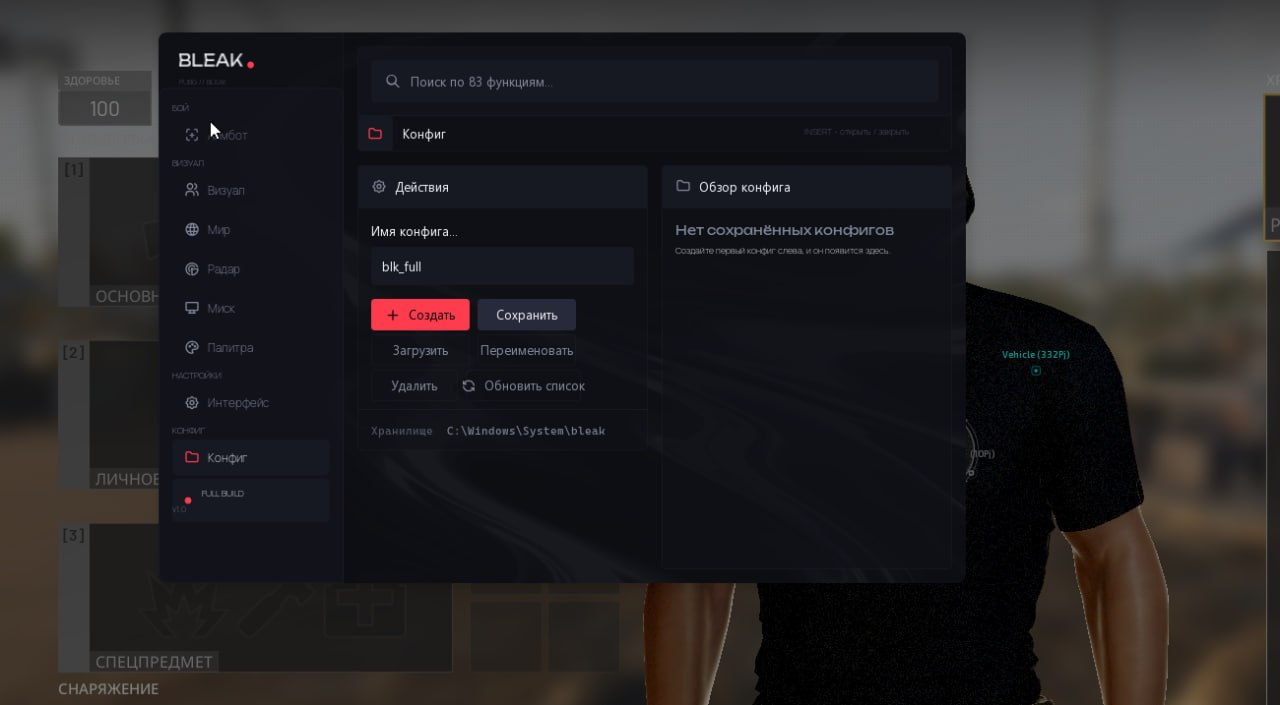
Input Name - Enter a name for your new configuration file (the build name is pre-filled by default).
Create New - Create and save a new configuration file with the entered name.
Save Selected - Overwrite the configuration with the typed name using the current menu settings.
Load Selected - Load settings from the configuration file selected in the list (applies them to the current session).
Rename - Rename an existing configuration file selected in the list.
Delete - Permanently delete the selected configuration file.
Refresh List - Force a refresh of the configuration list (useful if files were transferred manually).
Config list - Shows all saved configurations; the applied one is marked with an ACTIVE badge, and a double click on a row instantly loads it. The last active configuration is picked up automatically on the next launch.
Compare with another productPrice, rating and features side by side
Bleakfrom $3.00

More from Bleak

All brand products
  • Bleak — cheats for ARC Raiders
    HOTUndetected

    Bleak

    Cheats for ARC RaidersBleak
    68 purchases
    $4.86 / 1 DayGo to
  • Bleak — cheats for ROB RUN Cheats
    Undetected

    Bleak

    ROB RUN CheatsBleak
    45 purchases
    $3.99 / 1 DayGo to
  • Bleak — cheats for Rust
    HOTUndetected

    Bleak

    Cheats for RustBleak
    30 purchases
    $4.99 / 1 DayGo to

In any game with any cheat you can get banned. Try to play as carefully as possible!